CFMOTO RIDESYNC
CFMOTO Powersports, Inc.Auto & Vehicles
4.5398.00 Reviews
- Version
- 1.0.7
- Installs
- 10.00K
- Age Rating
- Everyone
Screenshots
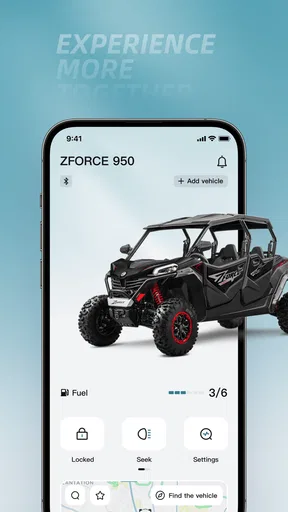
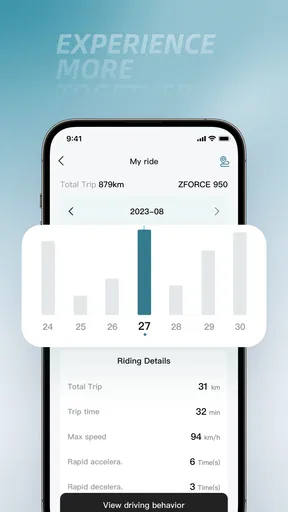
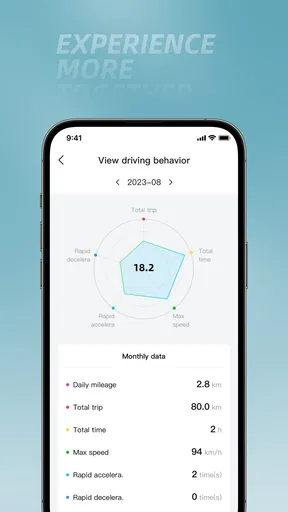
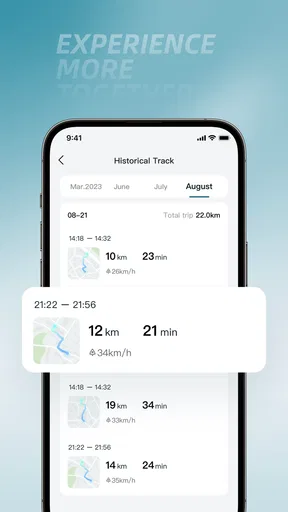
Our Review of CFMOTO RIDESYNC
 Analysis by Appyee
CFMOTO RIDESYNC is the kind of companion app that makes the most sense when you already own a compatible CFMOTO ride and want your phone to be part of the ownership experience. I found its appeal less in flashy extras and more in the promise of keeping connection, software maintenance, and ride information together instead of scattering those jobs across a dashboard, a dealer visit, and unrelated phone tools. That focus gives it a clear purpose, although it also means the app is not especially useful to someone who does not ride a supported CFMOTO vehicle.
Developed by CFMOTO Powersports, Inc., this free Auto & Vehicles app is aimed at everyday owners rather than casual motorcycle fans browsing for general information. Its age rating is Everyone, and it runs on Android 7.0 or later. The current release is version 1.0.7, while the app itself arrived on April 4, 2024. Those details matter because compatibility and support are more important here than they would be in a simple map or fuel-price app.
What the app is really good at
The central idea is straightforward: connect your ride, keep its software current, and examine information associated with your riding. In practice, that makes RIDESYNC most valuable as a routine ownership tool. I would not install it expecting a complete replacement for navigation, a social riding network, or a general-purpose maintenance platform. I would install it because I want one CFMOTO-focused place to check the relationship between my phone and my vehicle.
The strongest part of that approach is the reduced friction. A dedicated vehicle app can be easier to understand than a collection of generic solutions because the menus and terminology are built around one manufacturer’s ecosystem. When I am preparing for a ride, I would rather open a focused companion than search through unrelated apps trying to remember where a particular vehicle-related function lives. That concentration is a real advantage, especially for owners who do not enjoy learning technical systems.
The app’s three-part purpose also gives it a useful rhythm. Connection is something I would use when setting up or checking the phone-to-vehicle relationship. Updating belongs to occasional maintenance rather than every ride. Analysis becomes useful after riding, when information is more meaningful than it was before leaving home. Treating those as separate moments prevents the app from feeling like a dashboard filled with options that I never touch.
The best reason to keep RIDESYNC installed is continuity: it brings the digital side of owning a CFMOTO vehicle into the same place as the practical side. That does not make every ride better, but it can make ownership less fragmented.
Connection is most useful before the ride
I see the connection function as a preparation step, not something to experiment with while already on the road. Pairing or checking the connection before leaving gives me time to deal with ordinary problems such as a disabled phone setting, an interrupted setup, or a vehicle that is not ready to communicate. Even without turning the process into a ritual, opening the app at home is more sensible than discovering a connection issue in a parking area with gloves on and a group waiting.
There is also a practical benefit to separating setup from riding. A phone companion can be distracting when used at the wrong time, while a pre-ride check is controlled and deliberate. I would connect the phone, confirm that the app recognizes the ride, and then put the phone away unless I genuinely need it. That workflow makes the app a support tool rather than another screen competing for attention.
For a new owner, this is where patience pays off. I would avoid assuming that a successful phone installation automatically means the vehicle is ready to communicate. The sensible order is to install the app, open it when stationary, follow its connection process, and confirm that the expected ride information appears before relying on it. If the app is being used on a shared vehicle, I would also make sure the person who normally rides it understands which phone is connected and when.
Updates can save a trip, but they need planning
The update function is potentially the most important feature even though it may be used less often than connection or analysis. Software maintenance is easy to postpone because the vehicle still starts and rides normally. The problem with postponing it is that an update is usually more convenient at home than immediately before a long outing. I would check for available updates during ordinary preparation days, not in the final minutes before departure.
A careful workflow matters here. I would keep the phone sufficiently charged, remain near the vehicle, avoid switching between apps unnecessarily, and wait until the process has clearly finished. I would not begin an update in a weak-connectivity situation or while rushing to meet someone. These are simple habits, but they turn a potentially stressful maintenance task into a predictable one.
RIDESYNC is therefore better viewed as part of ownership upkeep than as a last-minute rescue tool. It can help reduce the chance of discovering an outdated system at an inconvenient time, but it cannot remove the need for sensible preparation. If you prefer having every technical task handled by a dealer, the update function may not change your routine very much. If you like taking responsibility for basic digital maintenance, it is a strong reason to use the app.
Analysis is more useful when you know what question you are asking
The word “analyze” can sound more advanced than the everyday value it provides. I get more from this kind of feature when I approach it with a specific question: Was this ride unusually demanding? Did my usual route feel different? Am I looking at a single outing or trying to notice a pattern over time? Without a question, graphs or ride information can become something I glance at once and forget.
A useful habit would be checking the app after a familiar route rather than only after an exciting trip. A repeatable commute, a regular weekend loop, or a short local ride gives me a baseline. Then the information has context. I can compare how the ride felt with what the app records, instead of treating every number as meaningful simply because it is displayed.
This is also where I would keep expectations realistic. A companion app can organize information connected to the vehicle, but it should not automatically replace a dedicated navigation app, a specialist riding computer, or a detailed maintenance log. Those tools may be better for route planning, long-term record keeping, or advanced analysis. RIDESYNC’s advantage is that it is close to the CFMOTO ownership experience, not that it must win every category.
Where the experience needs patience
The biggest limitation is the app’s narrow audience. Its usefulness depends on owning or using a compatible CFMOTO ride. Someone comparing motorcycles, looking for universal trip planning, or trying to track a bicycle will gain little from installing it. Even among CFMOTO owners, the exact usefulness can depend on the vehicle and the functions available to that model. I would treat compatibility as the first question before building a routine around the app.
That narrow focus also affects value over time. A general navigation app can remain useful when I change vehicles, travel with friends, or plan a route for someone else. RIDESYNC is more specialized. Its value is strongest while it matches my current CFMOTO ownership, and weaker when I want a tool that follows me across brands and types of vehicles.
Another point of friction is that connection, updates, and analysis are not equally important on every day. Some rides may offer no reason to open the app after the initial setup. That is not necessarily a design failure, but it can make the app feel quiet between meaningful uses. I would not judge it by how often I launch it. I would judge it by whether it makes the occasional connection check, update, or review easier when I need it.
There is a learning curve in deciding which information deserves attention. New owners may be tempted to inspect everything after every trip, while experienced riders may ignore the app entirely once the connection works. The better middle ground is selective use: check the connection before relying on it, handle updates when there is time, and review ride information when it can influence a future decision.
The app also should not be treated as a substitute for physical checks. A phone screen cannot replace inspecting tires, controls, lights, fluids, fasteners, protective equipment, or the general condition of the ride. I would use RIDESYNC alongside normal care, not as evidence that the vehicle is ready simply because the digital side looks normal. That distinction is especially important for riders who are drawn to the convenience of connected technology.
A realistic everyday routine
Imagine a Saturday morning when I am planning a longer local ride. The night before, I open RIDESYNC while the vehicle is nearby and check that the connection behaves as expected. If an update is available, I handle it then rather than delaying it until the helmet is on. In the morning, I perform my normal physical inspection and leave the phone out of the way once I am riding. After returning, I look at the ride information with one goal in mind: understanding how that route compared with my usual outings.
That routine shows both the app’s strength and its boundary. It can make digital preparation and reflection more organized, but it does not plan the route for me, inspect the machine for me, or make riding decisions for me. I still need other tools and ordinary judgment. The app earns its place by fitting neatly between those tasks, not by pretending to replace them.
A second useful scenario is ownership handover. If a family member occasionally uses the vehicle, I would establish the connection and review the basic workflow while both of us are stationary. That avoids the awkward situation where one person assumes the app is connected and the other assumes it is not. For shared use, clarity is more valuable than constantly changing settings.
Who should install it?
I would recommend RIDESYNC first to CFMOTO owners who want a manufacturer-focused companion and are comfortable doing basic setup on their phone. It is particularly suitable for riders who care about keeping connected features available, prefer handling software updates at home, or enjoy reviewing information after a ride. The free price removes the financial barrier, so the main decision is whether the app fits the vehicle and the owner’s habits.
It is also a reasonable choice for a new owner who wants to become familiar with the digital side of the ride early. Learning the connection and update workflow before a busy season is easier than trying to understand it during a trip. I would encourage new users to explore it while parked, then decide which parts genuinely help rather than feeling obliged to open it every time they ride.
I would skip it if I do not own a supported CFMOTO vehicle, if I only want turn-by-turn navigation, or if I need a brand-neutral log that will remain useful across several vehicles. A dedicated navigation app is the better choice for route building. A general maintenance tracker may be better for recording service history across different brands. RIDESYNC makes more sense when the CFMOTO connection itself is the reason for installing it.
The app’s public reception is encouraging without being a reason to overlook personal fit. It carries a 4.5 average from around 900 ratings, with over 300 written reviews and more than 10 thousand installs. I read that as evidence that the concept is landing for a meaningful group of users, not as proof that every owner will have the same experience. Compatibility, phone setup, and expectations still matter more than a store score.
My verdict after looking at the whole ownership workflow
CFMOTO RIDESYNC succeeds because it has a clear job. It connects the rider with the vehicle, provides a place to deal with updates, and gives ride information a home for later review. I like that it is focused rather than overloaded, and I think its greatest benefit is reducing the number of disconnected steps involved in owning a modern CFMOTO ride.
Its weaknesses are equally clear. It is not a universal riding companion, it may not be useful on every outing, and it cannot replace navigation, physical maintenance, or expert service. Owners who expect one app to manage every part of motorcycling may find it limited. Owners who understand it as a CFMOTO-specific support layer are more likely to appreciate what it does.
My recommendation is simple: if you have a compatible CFMOTO vehicle, install it, complete the connection while parked, and use the update feature proactively rather than urgently. Give the analysis tools a purpose by checking familiar rides and looking for information you can actually use. If you do not have that vehicle connection, choose a broader app instead. For the right owner, CFMOTO RIDESYNC is a practical companion that earns its place through useful moments, not constant attention.
With its Everyone rating, free access, and support for Android 7.0 or later, it is easy to try without committing money. The more important commitment is behavioral: treating the app as part of preparation and review, while keeping real riding skills and physical checks in charge. Used that way, CFMOTO RIDESYNC feels like a sensible addition to the garage rather than another phone app competing for attention.
Verdict
Strengths of CFMOTO RIDESYNC
- Connects riders with compatible CFMOTO motorcycles and services.
- Provides convenient access to selected motorcycle information on the go.
- Can help plan routes before a ride with a smartphone interface.
- Supports a more connected ownership experience for CFMOTO users.
- Useful companion for checking available riding and vehicle features.
Limitations of CFMOTO RIDESYNC
- Compatibility may be limited to specific CFMOTO models and regions.
- Some features may require Bluetooth, GPS, or constant phone permissions.
- Navigation performance can depend heavily on phone signal and map coverage.
- Background location use may increase battery consumption during rides.
- The app offers limited value if you do not own a compatible CFMOTO motorcycle.
Similar Picks in This Category
View All
Android Auto
Google LLC4.1

maxim — order a taxi & food
PT. SITO4.7

Штрафы ГИБДД: проверка с фото
Pays LLC – Штрафы ГИБДД4.7

Номерограм – проверка авто
Авто Ассист4.8

Дром Авто
Дром4.9

Frequently Asked Questions
What is CFMOTO RIDESYNC, and what does it do?
CFMOTO RIDESYNC is a companion app designed for compatible CFMOTO motorcycles and powersports vehicles. After pairing a supported vehicle, it can provide access to ride-related information such as navigation, trip planning, vehicle status, riding data, and connected dashboard features. The exact tools available depend on the vehicle model, display system, region, and app version, so users should check compatibility before downloading.
Which CFMOTO motorcycles and vehicles are compatible with CFMOTO RIDESYNC?
Compatibility is not universal across every CFMOTO model. The app generally works with vehicles equipped with a supported smart display or connectivity system, but availability can vary by model year, market, and installed firmware. Before installing, check the official CFMOTO compatibility information or your vehicle manual. If your motorcycle lacks the required connectivity hardware, some or all app functions may not be available.
How do I connect CFMOTO RIDESYNC to my motorcycle?
To connect the app, install CFMOTO RIDESYNC, create or sign in to an account if requested, and enable Bluetooth and location permissions on your phone. Turn on the motorcycle and follow the in-app pairing instructions, usually through the vehicle’s connected display. Keep the phone nearby during setup. If pairing fails, confirm that another phone is not already connected and update both the app and vehicle system when possible.
Does CFMOTO RIDESYNC require an internet connection or mobile data?
Some features may work through Bluetooth without continuous internet access, especially basic communication between the phone and the motorcycle. However, functions such as map updates, online navigation data, account synchronization, weather or traffic information, and certain cloud services may require Wi-Fi or mobile data. Navigation availability can also depend on downloaded map data, permissions, and regional support, so riders should prepare routes before traveling into areas with weak coverage.
Is CFMOTO RIDESYNC free, and what permissions does it request?
CFMOTO RIDESYNC is typically available to download without an upfront app charge, although mobile data costs, optional connected services, or region-specific features may apply. During setup, it may request Bluetooth, location, notification, storage, and account permissions to support pairing, navigation, trip recording, and alerts. Review each permission carefully and enable only what is needed, because restricting access can prevent connected features from working correctly.
